
My Daily AI Productivity Stack: The Best AI Tools for a Smarter Morning Routine (2026)
WhatsApp
Telegram
Facebook
Twitter
LinkedIn
Join Our WhatsApp Channel
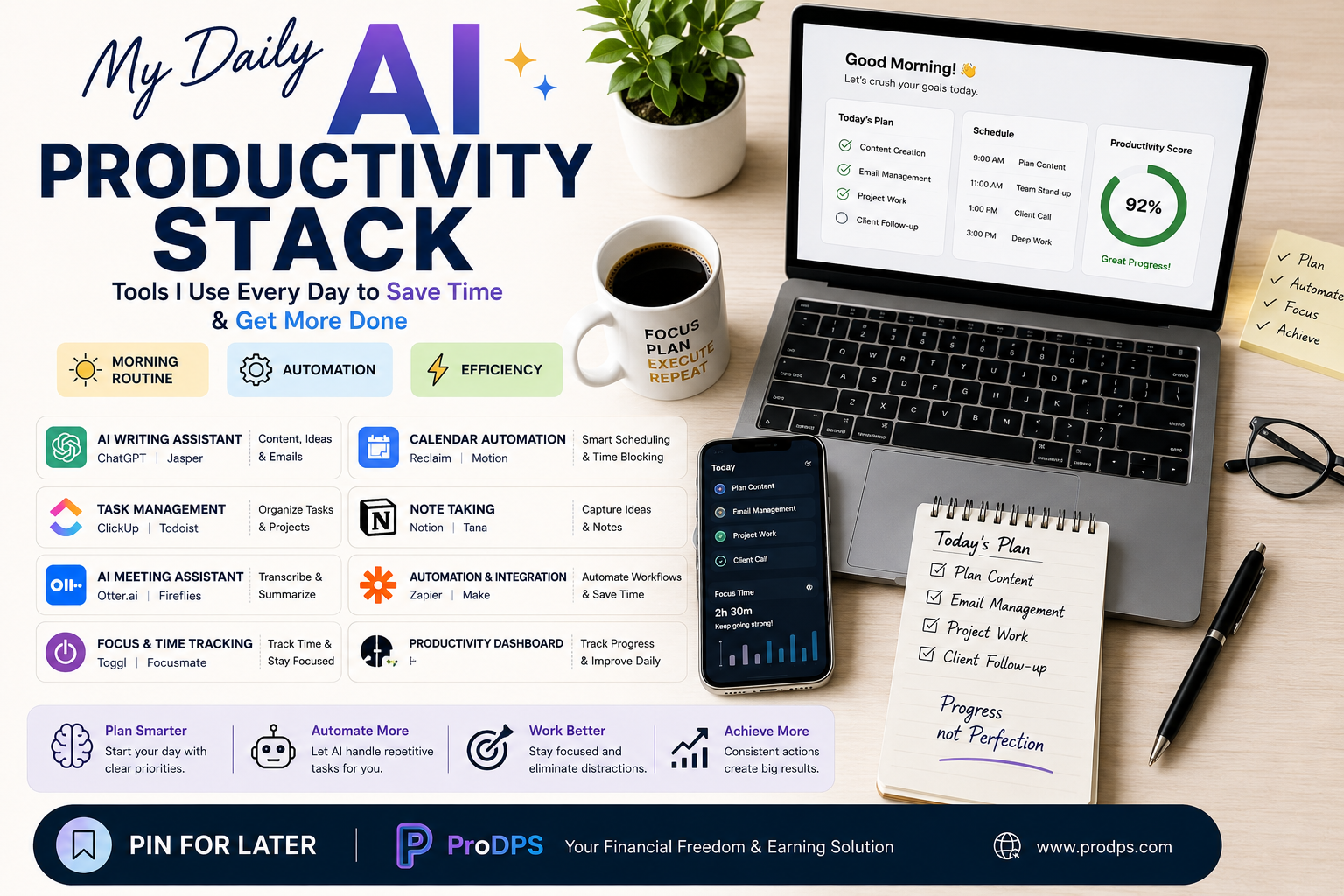
My Daily AI Productivity Stack: The Simple Workflow That Helps Me Get More Done
Artificial intelligence has become one of the most practical ways to save time and reduce repetitive work. Instead of replacing your creativity, AI can handle routine tasks so you can focus on meaningful work.
Whether you’re a student, freelancer, entrepreneur, content creator, or office professional, building a simple AI productivity stack can make your day more organized and less stressful.
In this guide, you’ll discover a complete daily workflow using AI tools that work together to improve planning, writing, organization, and focus.
Why Use an AI Productivity Stack?
A productivity stack is a collection of apps and tools that work together to help you complete your daily tasks efficiently.
Benefits include:
- Save hours every week
- Reduce repetitive work
- Stay organized
- Improve focus
- Create content faster
- Never forget important tasks
- Automate routine workflows
My Daily AI Productivity Workflow
| Time | Activity | AI Tool Category |
|---|---|---|
| 7:00 AM | Plan the day | AI Calendar |
| 7:15 AM | Review tasks | Task Manager |
| 8:00 AM | Writing & brainstorming | AI Writing Assistant |
| 10:00 AM | Deep work session | Focus Timer |
| 12:00 PM | Meeting notes | AI Meeting Assistant |
| 2:00 PM | Project management | Project Dashboard |
| 4:00 PM | Workflow automation | Automation Platform |
| 6:00 PM | Daily review | Notes & Knowledge Base |
Essential AI Tools for Productivity
1. AI Writing Assistant
AI writing tools help generate ideas, improve grammar, summarize documents, draft emails, and overcome writer’s block.
Perfect for:
- Blog writing
- Emails
- Reports
- Marketing copy
- Brainstorming
2. Calendar Automation
Smart scheduling tools automatically organize meetings, block focus time, and reduce calendar conflicts.
Useful for:
- Time blocking
- Automatic scheduling
- Meeting reminders
- Daily planning
3. Task Management
A task management system keeps every project organized in one place.
Track:
- Daily tasks
- Deadlines
- Team projects
- Personal goals
- Progress
4. AI Note-Taking
Modern note-taking apps organize information so nothing gets lost.
Great for:
- Research
- Class notes
- Business ideas
- Project documentation
- Personal knowledge management
5. AI Meeting Assistant
Instead of taking notes manually, AI can record, summarize, and organize meetings automatically.
Benefits include:
- Instant summaries
- Action items
- Searchable transcripts
- Follow-up reminders
6. Workflow Automation
Automation platforms connect your favorite apps and eliminate repetitive work.
Examples include:
- Saving email attachments automatically
- Sending notifications
- Updating spreadsheets
- Creating tasks automatically
- Synchronizing multiple apps
7. Focus & Time Tracking
Staying productive isn’t about working longer—it’s about working smarter.
Time-tracking apps help you:
- Measure productivity
- Eliminate distractions
- Improve concentration
- Build consistent work habits
Sample Productivity Scorecard
| Habit | Daily Goal | Status |
|---|---|---|
| Morning Planning | 15 Minutes | ✓ |
| Priority Tasks | Top 3 Completed | ✓ |
| Focus Sessions | 2–4 Sessions | ✓ |
| Inbox Cleanup | Once Daily | ✓ |
| Meeting Review | After Every Meeting | ✓ |
| Daily Reflection | 10 Minutes | ✓ |
Productivity Pyramid
             RESULTS
          ▲▲▲▲▲▲▲▲▲▲
         SMART DECISIONS
      ▲▲▲▲▲▲▲▲▲▲▲▲▲▲▲
        ORGANIZED TASKS
    ▲▲▲▲▲▲▲▲▲▲▲▲▲▲▲▲▲▲
     AUTOMATED WORKFLOWS
 ▲▲▲▲▲▲▲▲▲▲▲▲▲▲▲▲▲▲▲▲▲
      DAILY PLANNING
Tips for Building Your Own AI Productivity System
- Keep your daily workflow simple.
- Use one calendar for everything.
- Limit your daily priorities to three important tasks.
- Automate repetitive actions whenever possible.
- Store all notes in one place.
- Review your progress before ending the day.
- Update your task list every morning.
- Protect dedicated focus time from interruptions.
Common Mistakes to Avoid
- Installing too many productivity apps.
- Switching between multiple task managers.
- Ignoring calendar planning.
- Automating tasks without reviewing results.
- Skipping your daily review.
- Chasing every new AI tool instead of mastering a few.
Frequently Asked Questions
Is an AI productivity stack only for businesses?
No. Students, freelancers, remote workers, and anyone managing daily tasks can benefit from AI-assisted productivity.
Do I need paid AI tools?
Not necessarily. Many excellent AI productivity tools offer free plans that are sufficient for most users.
How long does it take to build a productive routine?
Most people can establish a consistent workflow within a few weeks by starting with simple habits and gradually adding automation.
Final Thoughts
Productivity isn’t about filling every minute of your day with work. It’s about using your time intentionally. A thoughtfully designed AI productivity stack helps reduce repetitive tasks, improve organization, and create more time for creative thinking and meaningful work.
Start with a few essential tools, build habits that support your goals, and automate repetitive processes as your workflow evolves. Small improvements made consistently can lead to significant gains in productivity over time.
---Advertisement---
[adinserter block="1"]
LATEST post
Nelko P21 Label Maker Machine with Tape, Bluetooth Label Printer, White
October 26, 2026
7:47 pm

Quntis Monitor Light Bar Review for a Better Home Office
October 26, 2026
7:34 pm

Swagbucks & InboxDollars $20 Bonus Method – Earning Guide
August 20, 2026
7:59 am

TextNow Account Create Method – Complete Guide for Beginners
August 19, 2026
10:43 pm

SMM Panel কী? Social Media Services ও Marketing Guide 2026
August 18, 2026
9:59 pm